
Beava Quickstart
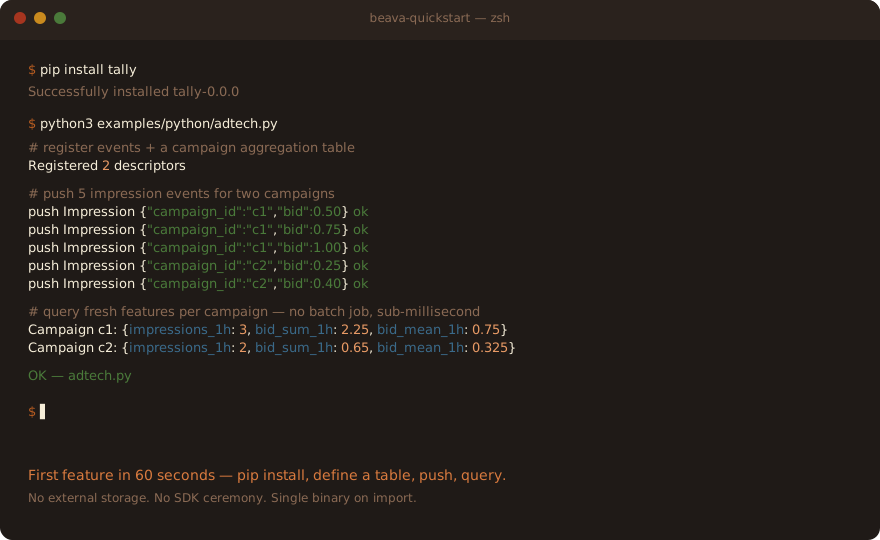
pip install tally-> first feature in 60 seconds.
Beava is a real-time feature server. You declare aggregations in plain Python,
push events over HTTP, and query computed features by entity key --
sub-millisecond -- with curl alone or any HTTP client.
Install
pip install tally
Pre-release naming. The PyPI package is currently published as
tally(the project's repo codename). Thebeavapackage name is reserved for v0.0.0 GA. Until then, installtallyand import asimport beava as bv(the import name is alreadybeava).
The pip package ships the Python SDK. The beava server binary is bundled and
discovered automatically by bv.App() (no separate install). For production
deployment use the Docker image (Phase 13.8 release).
First feature in 60 seconds
import beava as bv

# Define an event source.
@bv.event
class Impression:
    campaign_id: str
    bid: float

# Define an aggregation table.
@bv.table(key="campaign_id")
def CampaignStats(imp: Impression):
    return imp.group_by("campaign_id").agg(
        impressions_1h=bv.count(window="1h"),
        bid_sum_1h=bv.sum("bid", window="1h"),
        bid_mean_1h=bv.mean("bid", window="1h"),
    )

# Run an embedded local server (no separate install needed).
with bv.App() as app:
    app.register(Impression, CampaignStats)

    # Push events.
    for camp_id, bid in [("c1", 0.50), ("c1", 0.75), ("c2", 0.40)]:
        app.push("Impression", {"campaign_id": camp_id, "bid": bid})

    # Query computed features.
    print(app.get("CampaignStats", "c1"))
    # -> {"impressions_1h": 2, "bid_sum_1h": 1.25, "bid_mean_1h": 0.625}
That's it. No external storage, no separate server install, no SDK ceremony.
Beava's embed mode spawns a local beava binary
on ephemeral ports -- the same binary you'd run in production for HTTP/TCP
feature serving.
Global counter (per ADR-003)
Need a feature that aggregates across all entities -- e.g., total platform
throughput, current entity count, top-K-globally? Declare a global table by
omitting the key= kwarg on @bv.table:
# Same Impression event from above.

@bv.table   # no key= -> global table (per ADR-003)
def TotalImpressions(imp: Impression):
    return imp.agg(total=bv.count(window="forever"))   # no group_by

with bv.App() as app:
    app.register(Impression, CampaignStats, TotalImpressions)

    for camp_id, bid in [("c1", 0.50), ("c1", 0.75), ("c2", 0.40)]:
        app.push("Impression", {"campaign_id": camp_id, "bid": bid})

    # Per-entity query (existing) -- 2 args:
    print(app.get("CampaignStats", "c1"))   # -> {"impressions_1h": 2, ...}

    # Global query (new) -- 1 arg, no entity:
    print(app.get("TotalImpressions"))      # -> {"total": 3}
Per ADR-003,
all 53 operators work with both per-entity and global aggregation. See
docs/concepts/global-aggregation.md for the
full conceptual treatment (when to use global vs per-entity, performance
characteristics, composition with cold_after=).
bv.demo()
For a self-contained tour with realistic-shape data:
import beava as bv

bv.demo("adtech")     # ad-impression / click-rate aggregations
bv.demo("fraud")      # high-cardinality velocity + sketch
bv.demo("ecommerce")  # purchase / basket aggregations
Each demo registers descriptors, pushes ~10 events, and queries the resulting features. See examples/python/adtech.py, examples/python/fraud.py, and examples/python/ecommerce.py for the full source.
Cross-language note: Pipeline authoring is Python-only in v0. The TypeScript and Go SDKs are communicate-only — they push events, register pre-compiled JSON descriptors (authored from Python), and read features. Use Python to design and compile your pipeline; TS/Go services then push events + read features against the same registered pipeline.
Next steps
- API reference: docs/sdk-api/python.md -- full Python SDK surface (App, decorators, expressions, op helpers)
- Operator catalog: docs/operators/index.md --
all 54 op pages (
count,sum,mean,n_unique,quantile,ewma, ...) - Wire contract: docs/wire-spec.md -- frame format + JSON Schema 2020-12 contracts (for porting to other languages)
- Pipeline DSL: docs/pipeline-dsl/overview.md
--
@bv.event,@bv.table, chain methods, expressions - Architecture: docs/architecture/ -- single-thread apply + mio data plane + WAL/snapshot durability + memory budget
For production deployment + scaling guidance see the docs site (Phase 13.7).